현재 유지보수중인 사이트중에 오래전에 이클립스로 개발되어 있는 spring 프로젝트가 하나 있다.
Eclipse Luna(4.4.2), Java-jdk 1.6, Tomcat 7.0, Apache Struts 1.1 개발되어 있다.
이클립스의 버벅임 때문에 소스를 수정하기 힘이 들때가 많았다.
Spring boot 프로젝트이면 vscode로 실행 및 debug를 할 수 있으나
vscode의 경우 일반 Spring 또는 Apache Struts 경우 실행할때마다 Build 후 War로 구동시키는 방법 밖에 없는것 같다.
그래서 고민 후 이클립스로 프로젝트 구동 후 소스코드 및 로그만 vscode에서 확인하는 걸로 해보니 할결 편해졌다.
오랜된 소스라 Jsp에 거의 비지니스 로직이 있고 Debug는 거의할 필요없는 수정 요청 정도여서 편집기로만
vscode로 사용하면 되기에 해당 설정이 나에게는 적당한 방법이 었다.
구성
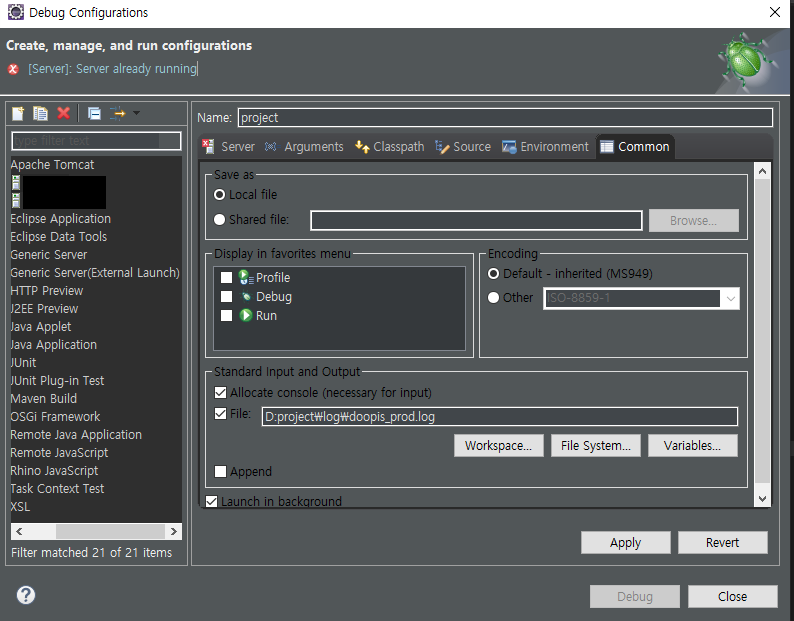
Eclipse에서 tomcat 프로젝트를 구동
Eclipse 메뉴 > Run > Debug Configurations > 해당 Tomcat 설정 > Common > Standard Input and Ouput > File
로그 파일 생성
vscode
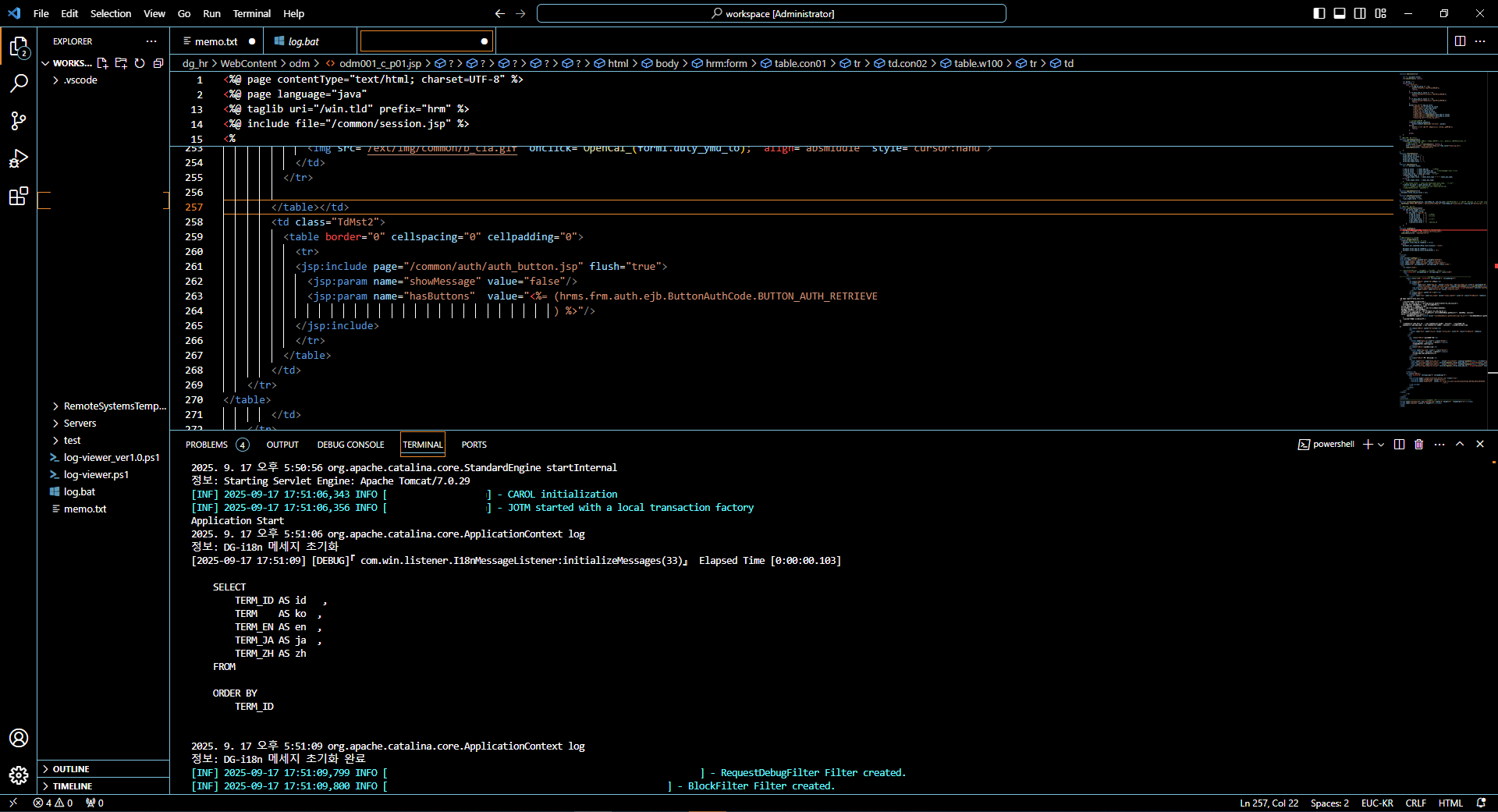
편집 및 로그확인을 vscode에서 수행할 수 있다.
vscode에서 편집은 그냥 프로젝트를 열면 되고 로그는 터미널에서 이클립스 설정한 로그파일을 파워쉘
Get-Content $Path -Wait -Tail 20으로 실시간으로 확인하면 됩니다.
vscode에서 터미널에 파월쉘 스크립트로 확인
아래 스크립트는 개발 및 운영 로그를 한번에 확인할 수 있게 파워쉘을 작성하였다.
이클립스 및 vscode를 2개를 실행시켜서 하기에 이게 무슨 괴조합이냐라고 할 수 있지만 Eclipse의 멈춤 빡침보다 훨신 쾌적하다.
#파워쉘 스크립트 실행 log.bat
@echo off
powershell -NoLogo -ExecutionPolicy Bypass -File "%~dp0log-viewer.ps1"
#log-viewer.ps1
$devLog = "D:\project\dev.log"
$prodLog = "D:\project\prod.log"
# --- DEV 로그 모니터링 Job ---
Start-Job -ScriptBlock {
$Path = "D:\project\dev.log"
#$Prefix = "[DEV]"
$Prefix = ""
$inSqlBlock = $false
$inErrorBlock = $false
Get-Content $Path -Wait -Tail 20 | ForEach-Object {
$line = $_
# SQL 블록 시작
if ($line -match "^-{5,}" -or $line -match "^\s*SQL\s*$" -or $line -match "^\s*select\s" -or $line -match "^\s*insert\s" -or $line -match "^\s*update\s" -or $line -match "^\s*delete\s") {
$inSqlBlock = $true
Write-Host "$Prefix $line" -ForegroundColor Green; return
}
# SQL 블록 종료
if ($inSqlBlock -and ($line -match "^-{5,}" -or $line -eq "")) { $inSqlBlock = $false; Write-Host "$Prefix $line" -ForegroundColor Green; return }
# SQL 블록 내부
if ($inSqlBlock) { Write-Host "$Prefix $line" -ForegroundColor Green; return }
# Exception / Error 블록 시작
if ($line -match "Exception" -or $line -match "Error") { $inErrorBlock = $true; Write-Host "$Prefix [ERR] $line" -ForegroundColor Red; return }
# Error stack trace
if ($inErrorBlock -and $line -match "^\s+at ") { Write-Host "$Prefix [ERR] $line" -ForegroundColor Red; return }
# Error 블록 종료
if ($inErrorBlock -and $line -eq "") { $inErrorBlock = $false; Write-Host "$Prefix $line" -ForegroundColor White; return }
# 일반 로그 레벨별 색상
switch -Regex ($line) {
" INFO " { Write-Host "$Prefix [INF] $line" -ForegroundColor Cyan; break }
" WARN " { Write-Host "$Prefix [WRN] $line" -ForegroundColor Yellow; break }
" ERROR " { Write-Host "$Prefix [ERR] $line" -ForegroundColor Red; break }
" DEBUG " { Write-Host "$Prefix [DBG] $line" -ForegroundColor DarkGray; break }
default { Write-Host "$Prefix $line" -ForegroundColor White }
}
}
}
# --- PROD 로그 모니터링 Job ---
Start-Job -ScriptBlock {
$Path = "D:\project\prod.log"
#$Prefix = "[PROD]"
$Prefix = ""
$inSqlBlock = $false
$inErrorBlock = $false
Get-Content $Path -Wait -Tail 20 | ForEach-Object {
$line = $_
if ($line -match "^-{5,}" -or $line -match "^\s*SQL\s*$" -or $line -match "^\s*select\s" -or $line -match "^\s*insert\s" -or $line -match "^\s*update\s" -or $line -match "^\s*delete\s") {
$inSqlBlock = $true
Write-Host "$Prefix $line" -ForegroundColor Green; return
}
if ($inSqlBlock -and ($line -match "^-{5,}" -or $line -eq "")) { $inSqlBlock = $false; Write-Host "$Prefix $line" -ForegroundColor Green; return }
if ($inSqlBlock) { Write-Host "$Prefix $line" -ForegroundColor Green; return }
if ($line -match "Exception" -or $line -match "Error") { $inErrorBlock = $true; Write-Host "$Prefix [ERR] $line" -ForegroundColor Red; return }
if ($inErrorBlock -and $line -match "^\s+at ") { Write-Host "$Prefix [ERR] $line" -ForegroundColor Red; return }
if ($inErrorBlock -and $line -eq "") { $inErrorBlock = $false; Write-Host "$Prefix $line" -ForegroundColor White; return }
switch -Regex ($line) {
" INFO " { Write-Host "$Prefix [INF] $line" -ForegroundColor Cyan; break }
" WARN " { Write-Host "$Prefix [WRN] $line" -ForegroundColor Yellow; break }
" ERROR " { Write-Host "$Prefix [ERR] $line" -ForegroundColor Red; break }
" DEBUG " { Write-Host "$Prefix [DBG] $line" -ForegroundColor DarkGray; break }
default { Write-Host "$Prefix $line" -ForegroundColor White }
}
}
}
# --- 두 Job 출력 확인 (실시간 스트리밍)
Get-Job | Receive-Job -Wait -AutoRemoveJob'TOOL > VSCODE' 카테고리의 다른 글
| VSCODE 윈도우 화면 깨짐 (0) | 2025.09.23 |
|---|